
Airbnb shows an error when we click "Connect with Airbnb"
The Airbnb account is still connected to another Channex account. Remove the old connection on Airbnb and connect again.
#What the client asked
Connecting the property's Airbnb account from ClearHost (Connect with Airbnb) ended in an error instead of connecting.
#What it is
The Airbnb account is already connected to another Channex account, or an old connection is stuck. Airbnb lets one Channex connection hold the account, so the new one is refused until the old one is removed.
#How we solved it
- 1
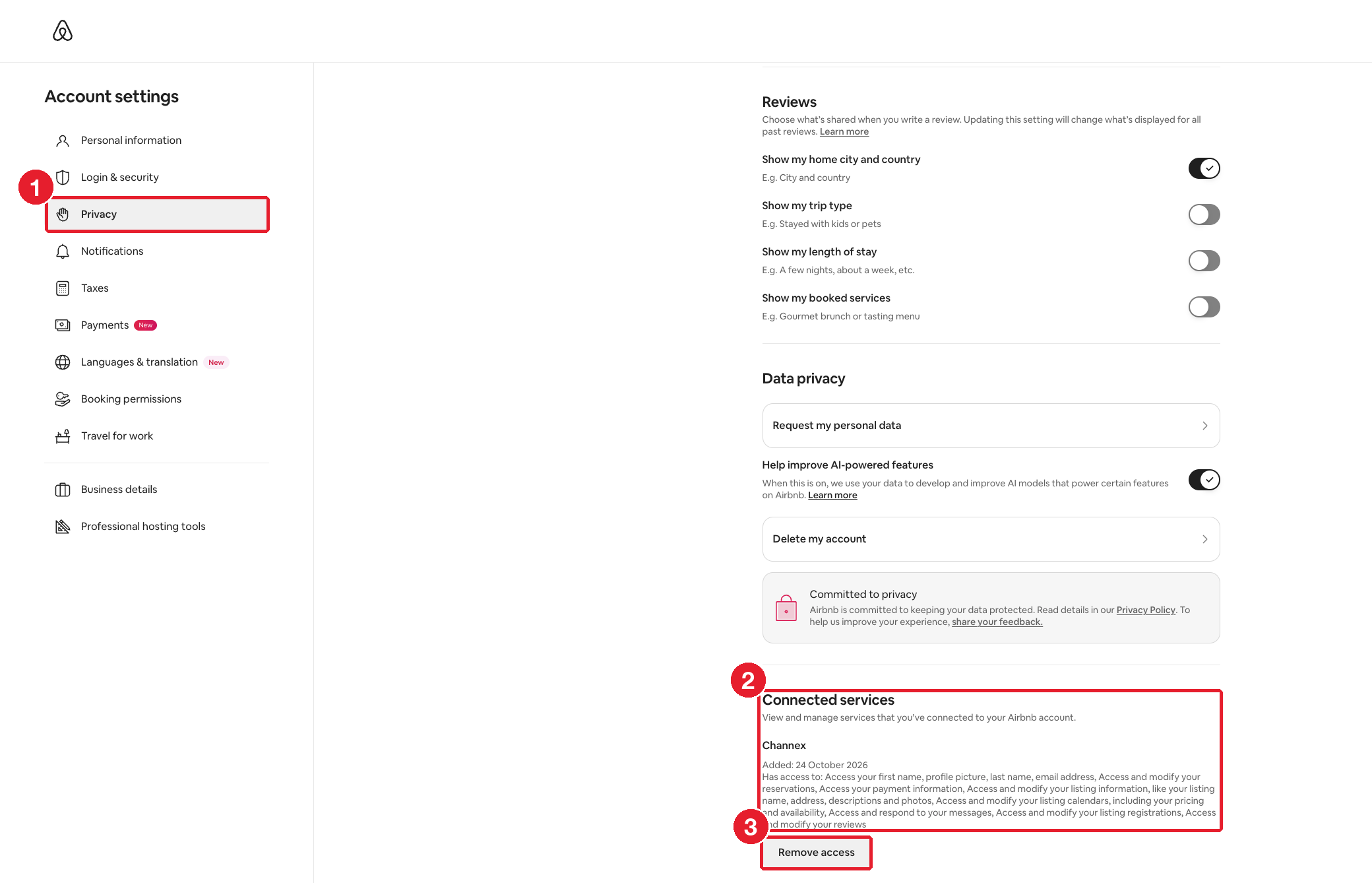
On Airbnb, go to Account settings → Privacy. Use the property's Airbnb login.
- 2
Scroll down to "Connected services" and find Channex.
- 3
Click "Remove access".
- 4
Connect again from ClearHost. Follow the Airbnb connection steps from the start.
#How to check it worked
The Airbnb channel in ClearHost saves without an error, and the Airbnb listings show up for mapping.